
Getting started
Install Sorted, find its buttons and sort your first chest.
What you need #
- Minecraft 1.21 to 1.21.3, 1.21.10, 1.21.11 or 26.1 to 26.3
- Fabric Loader 0.16 or newer
- Fabric API and YACL
- Mod Menu, optional, for a settings button in the mod list
Install #
- Install Fabric Loader for your Minecraft version.
- Download Sorted from Modrinth, and Fabric API and YACL. Pick the Sorted file for your Minecraft version.
- Put the files in the
modsfolder of your Minecraft folder. - Start the game and open a world.
With the Modrinth app or another launcher that reads Modrinth, installing Sorted picks the right file and pulls in Fabric API and YACL for you.
On NeoForge, the same file runs with Sinytra Connector and Forgified Fabric API in place of Fabric API. That is not tested before each release.
The first sort #
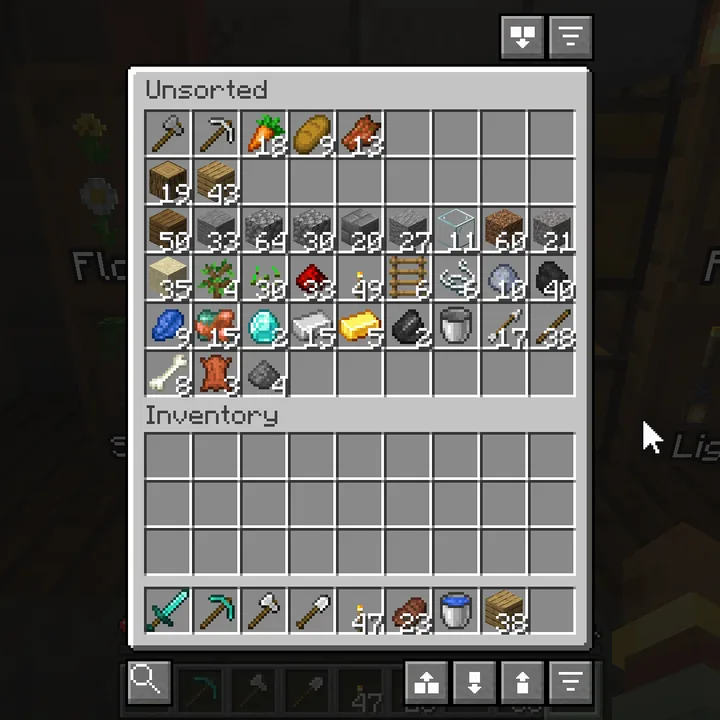
- Open a chest. Above it, on the right, is the sort button. Click it.
- Press E for your inventory. Below it is a row of buttons: search on the left, and quick fill, quick stack and sort on the right. See The buttons.
- Press R to sort your inventory. Your hotbar is left alone.
- Walk up to your chests, open your inventory and click Quick Stack. See Quick Stack.
Nothing on the server #
Sorted is client-side only. It works on vanilla servers, Realms and in modpacks, and needs nothing installed on the server.
On a server, Sorted moves items with the same clicks you would make by hand, at a limited speed. Some servers do not allow inventory mods. Check the rules. See Servers.
Something missing or wrong on this page? Say so on Discord.