
Storage API
Let Sorted treat your containers like chests: its buttons, sorting, Quick Stack and search.
Out of the box, Sorted puts its container buttons only on vanilla chests, barrels and shulker boxes. Register your container's screen with SortedStorage and it is treated the same. From Sorted 0.1.22.
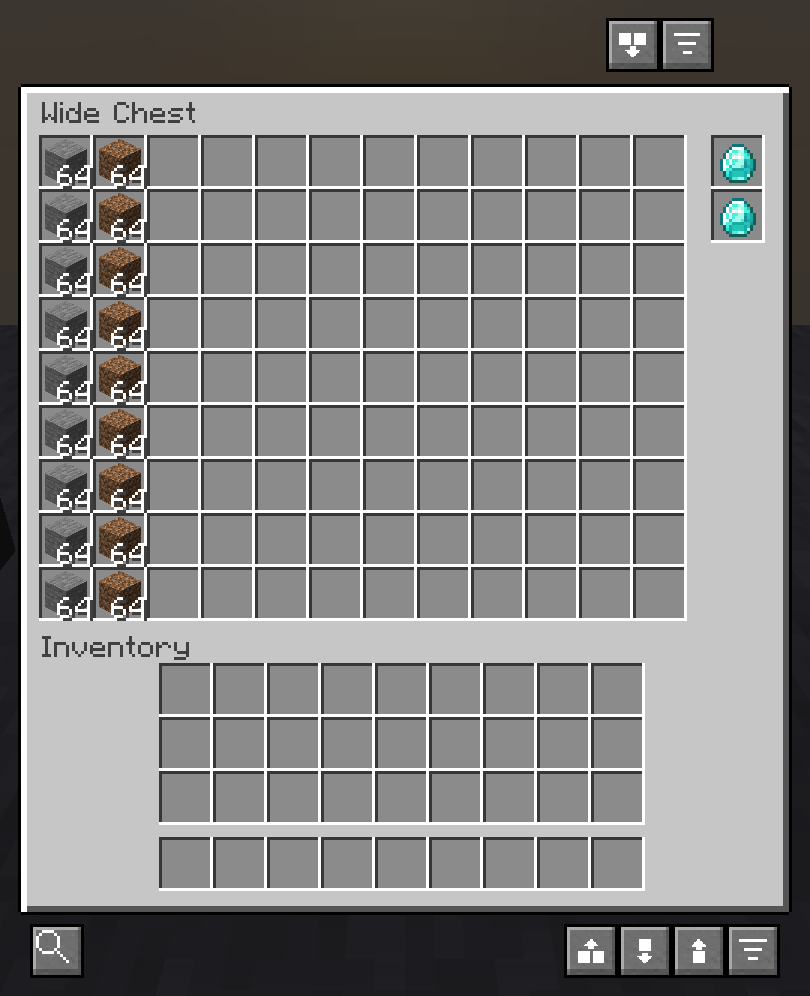
What a registered screen gets #
- The container buttons: Sort and Pull All above it, Quick Empty, Quick Fill and Quick Stack below.
- Sorting and the quick actions on its storage slots only. See the slot filter.
- Sort on open, for players who turned Auto-sort containers on open on.
- No server-menu check. That check is for the vanilla chest screens servers use as shops, and your screen cannot be one.
- Search, the labels and
SortedLookupknow what is in it once the player has opened it. - Quick Stack and Quick Fill from the inventory reach it once the player has opened one container of that block, and so does Auto-scan nearby containers on servers. Sorted remembers the block from then on, across sessions.
Register a screen #
Once, on the client, for example from your client initializer. The id is the registry id of your MenuType (Yarn: ScreenHandlerType).
SortedStorage.register("mymod:iron_chest");
SortedStorage.register("mymod:gold_chest");
Not sure of the id? Open your container in the game, close it and type /sorted storage.
Keep slots out of it #
If your screen has slots that are not storage, like upgrade, filter or fuel slots, pass a filter. It gets a menu slot index, the order of menu.slots, and is only asked about slots that are not the player's inventory. Return true for storage.
// Menu slots 0 and 1 are upgrade slots, then 54 slots of storage.
SortedStorage.register("mymod:backpack", slot -> slot >= 2);- Sorting only rearranges the slots the filter lets through.
- Quick Stack and Quick Empty put items in with your menu's shift-click (
quickMoveStack), so it should send items to storage slots only. - Search and the labels only count the slots the filter lets through.
- In singleplayer, nearby Quick Stack and Quick Fill go through the same slots, and each slot's
mayPlacestill applies.
Place the buttons #
Without this, the buttons go where they go on a chest: one row just above the title, one along the bottom of the panel. If that covers something on your screen, place them yourself. All positions are in GUI pixels from the top-left corner of your panel (leftPos, topPos).
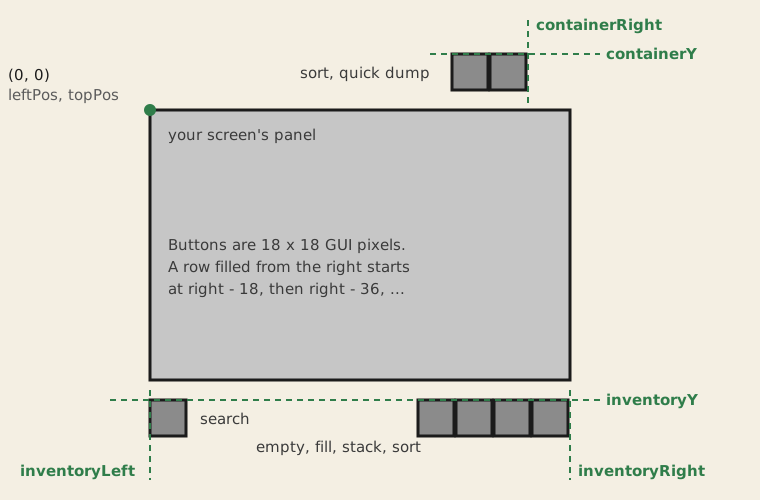
// The screen is 258 wide and 277 tall; its upgrade column is the right 26 pixels.
SortedStorage.placeButtons("mymod:wide_chest",
        232, -22,       // container row: right end, top
        4, 254, 280);   // inventory row: left end, right end, top
Containers with two halves #
For a block that joins with a neighbour into one container, like a large chest, tell Sorted where the other half is. It is asked with a packed BlockPos in the client's current world and returns the other half's packed position, or the same position for a block on its own. Without it, each half is recorded on its own and its items are counted twice.
// By block id: this is asked about blocks in the world, not screens.
SortedStorage.registerOtherHalf("mymod:iron_chest", packed -> {
    ClientLevel level = Minecraft.getInstance().level;
    if (level == null) return packed;
    BlockPos pos = BlockPos.of(packed);
    BlockState state = level.getBlockState(pos);
    if (!state.is(MyBlocks.IRON_CHEST) || state.getValue(ChestBlock.TYPE) == ChestType.SINGLE) {
        return packed; // on its own
    }
    return pos.relative(ChestBlock.getConnectedDirection(state)).asLong();
});
Without a compile dependency #
Every storage call takes plain Java types, so reflection is enough:
static void registerWithSorted() {
    try {
        Class<?> api = Class.forName("com.sorted.api.SortedStorage");
        api.getMethod("register", String.class, IntPredicate.class)
                .invoke(null, "mymod:backpack", (IntPredicate) slot -> slot >= 2);
    } catch (ReflectiveOperationException e) {
        // Sorted is not installed, or older than 0.1.22. Nothing to do.
    }
}
Players can do it too #
A player can add a screen with /sorted storage add or the Modded storage screens setting. See Containers from other mods. That gives the buttons, but no slot filter, placement or other-half hook, so a registered screen works better.
Good to know #
- Vanilla menu types (
minecraft:...) are ignored, registered or listed. Servers use vanilla chest screens as shops, and Sorted keeps guarding those. - The category layouts follow your grid: the width is the number of storage slots in the first row, read from the slot positions. Lay storage out in rows, left to right.
- On a server, Sorted opens the block the way a player does, by using it with an empty hand. It only accepts the screen it learned for that block.
- In singleplayer, nearby Quick Stack and Quick Fill build your menu on the integrated server from the block's menu provider, move items through its storage slots, and close it again. Your menu opens and closes as it would for a player, so a lid may move.
- An anvil name shows in search and on the label. A translated default title counts as no name.
Reference #
| SortedStorage | What it does |
|---|---|
register(String menuTypeId) | Treat screens of this menu type as storage, every slot outside the player's inventory included. |
register(String menuTypeId, IntPredicate storageSlot) | The same, with only the menu slots the filter accepts. |
placeButtons(String menuTypeId, int containerRight, int containerY, int inventoryLeft, int inventoryRight, int inventoryY) | Where the two button rows go, relative to the panel. |
registerOtherHalf(String blockId, LongUnaryOperator otherHalf) | Where the other half of a two-block container is. |
isStorage(String menuTypeId) | Whether Sorted treats this screen as storage now, by a mod or by the player's list. |
Something missing or wrong on this page? Say so on Discord.