
Map looks
Satellite, Atlas and Minecraft, and the settings that color the ground: shading, biomes, water and night.
Map style under Map in the settings sets the look of both maps at once. The walkthrough asks for it too, on your own map.
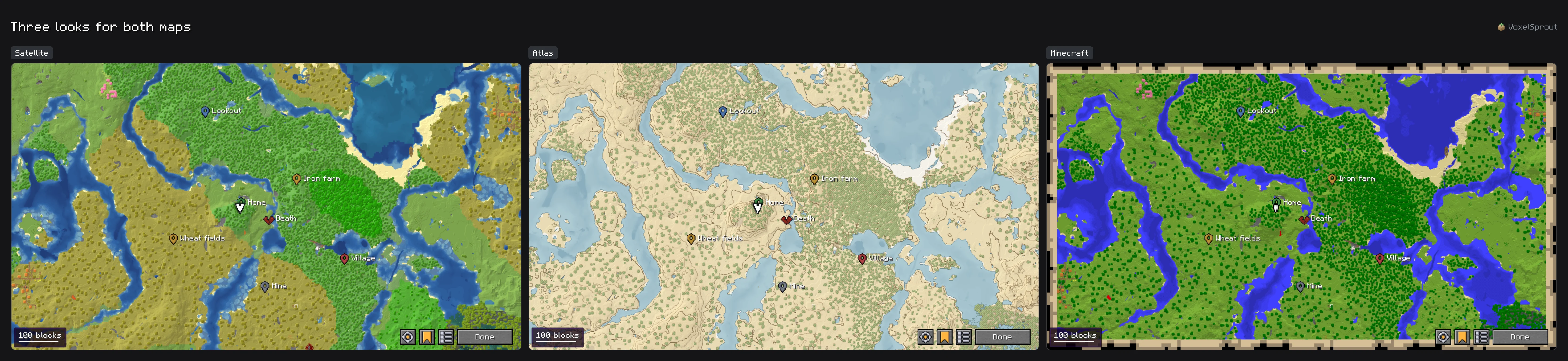
- SatelliteThe world's own colors, with light on the slopes and water by depth. The default.
- AtlasA drawn map on parchment, with contour lines every 8 blocks, forests in dots and a drawn coast.
- MinecraftPainted the way a map item paints it, on the map's own paper.
Color and relief #
- Height shading default 60%
- Slopes are lit from the north-west, so hills, valleys and cliffs stand out. Higher is stronger; off draws the map flat.
- Biome colors default On
- Grass, leaves and water in the color of their biome, as you see them in the world. Off: one color for each block everywhere.
- Water depth default On
- Deeper water is drawn darker, so coasts, rivers and deep oceans are easy to tell apart.
- Day and night default Off
- The map turns a little darker at night, with the sky. Never so dark it cannot be read.
What the map sees through #
- Glass is looked through, to the ground under it.
- Ice and stained glass tint the ground under them instead of hiding it. Stained glass of different colors over each other mixes, as looking down through it does.
- Lava glows.
- Ground filled in from Distant Horizons looks a little paler, so what you have seen yourself stands out.
The edge of what you have seen #
The map fades out softly where your exploring ends, instead of stopping in hard squares. It stays sharp at every GUI scale.
In the Minecraft look the map item's paper is the frame, and the End stays the game's own map. The End's floating islands are in the Satellite and Atlas looks. See Caves, the Nether and the End.
Next, you may want to
Something missing or wrong on this page? Say so on Discord.