
Sharing in chat
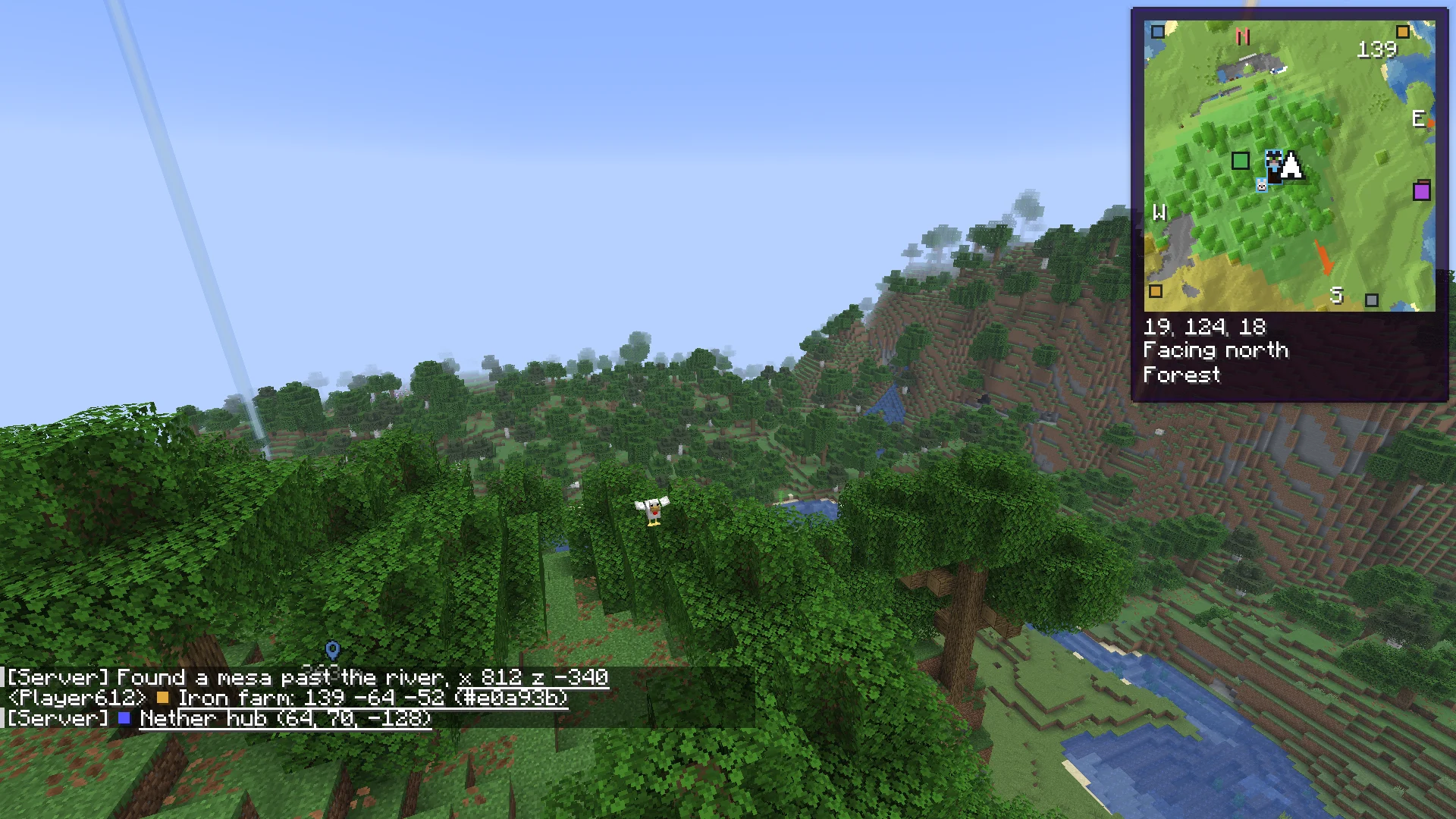
Share a waypoint as a line anyone can read, and click coordinates in chat however they are typed, also Xaero's and JourneyMap's.
Share a waypoint #
Right-click a waypoint, or a spot on the world map, and pick Share in chat. Chat gets a line anyone can read, with or without Charted:
Base: 100 64 -20 (nether, #d24c4c)A friend with Charted sees it underlined. A click saves it with its name, dimension and color: Save it, Save and edit, or go there.
For friends with other map mods #
Share waypoints as under Waypoints in the settings writes your shares in the form Xaero's Minimap or JourneyMap turn into a button, so a friend using them can save yours. Charted reads all three, whichever you pick.
| Share waypoints as | The line |
|---|---|
| Charted | Base: 100 64 -20 (nether, #d24c4c) |
| Xaero's | xaero-waypoint:Base:B:100:64:-20:20:false:0:Internal-the-nether-waypoints |
| JourneyMap | [name:"Base", x:100, y:64, z:-20, dim:minecraft:the_nether] |
Coordinates however they are typed #
With Coordinates in chat on, Charted underlines coordinates in chat and a click offers Save as a waypoint, Go there (gone once you arrive) and Show on the world map. The tooltip says how Charted read them.
| Typed as | Read as |
|---|---|
100 64 -20, 100, 64, -20, 100/64/-20 | X, Y and Z |
X: 100, Y: 64, Z: -20, x100 y64 z-20 | X, Y and Z |
x 100 z -20, Z: -20, X: 100, x 300 and z 500 | X and Z, in any order |
xyz 100 64 -20, XYZ: 100/64/-20 | X, Y and Z |
xz 100 -20 | X and Z |
x 100 y -20 | X and Z: no Z, so it is read the way most people mean it |
Bare numbers are read with care, since chat is full of them: three in a row only, the middle one a height a world can have, and not all three small, so a score of "3 2 1" is not a place.
Try a line #
Type or paste a chat line. This box reads it the way the game does and shows what would be underlined.
- Base
- X
- 100
- Y
- 64
- Z
- -20
- in the
- Nether
A server's clickable text #
Text a server already made clickable, a link that teleports you or opens a menu, keeps its own action. Charted leaves it as it is.
- Coordinates in chat default On
- Coordinates in chat are underlined: click one to save it, go there or see it on the world map.
- Share waypoints as default Charted
- How "Share in chat" writes a waypoint: Charted, Xaero's or JourneyMap.
Next, you may want to
Something missing or wrong on this page? Say so on Discord.