
Status colors
The colors that mark wrong, turned and extra blocks, and the other hints on screen.
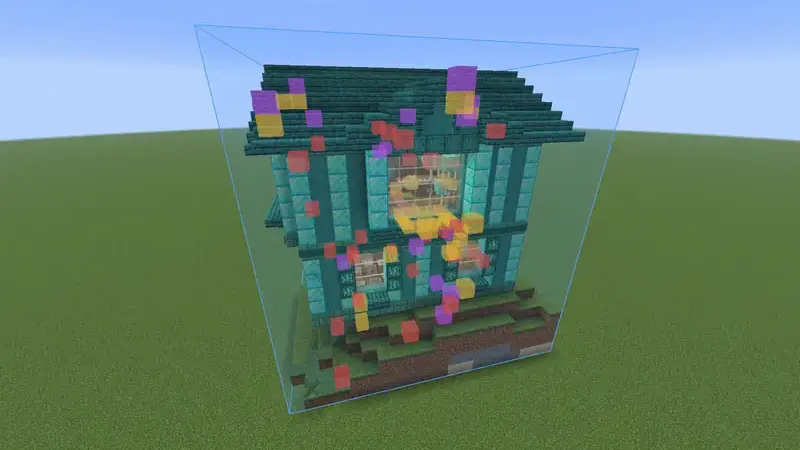
The colors #
| Color | Meaning |
|---|---|
| Amber, dashed | Wrong state: the right block, turned or set the wrong way. |
| Red | Wrong block: a different block than the build asks for. |
| Purple | Extra: a block where the build wants nothing. |
Blocks that are right are not marked. Blocks that are missing show as the ghost.
Outline or tint #
Status overlay in the settings has three choices. Tint colors the whole block and is the default. Outline draws a border and keeps the block itself visible. Off hides the colors.
Show only one kind #
Each build has a Show button in the Loaded tab. It switches between Unbuilt, Wrong state and Extra. There is also a key for it, which is not set by default.
Look at a block #
With Look-at block info on, a small panel names the block you look at. For a block of a build it says whether it is right, or what it should be and what is there now.
The next block #
With Highlight next block on, the next block to place is marked with a box and a beam. It picks a block you carry and can place right now, and prefers the lowest one, so you build from the bottom up.
Things you cannot fix #
With Survival sanity checks on, states that nobody can place are not counted as mistakes. That goes for creative too.
- Leaves of a tree, how far a crop has grown, a lit furnace, a piston that was extended.
- Dirt where the build asks for grass, farmland or a path, when the block above it would turn that back into dirt anyway.
- A pressed button or a pressure plate someone stood on.
What you can place or click into shape still counts: a lever, the delay of a repeater, an open door. So does redstone that is powered, such as a lit lamp.
Something missing or wrong on this page? Say so on Discord.